
Table of Contents
Digital signage in Austin has moved fast from “nice to have” to standard equipment for restaurants, medical offices, retail storefronts, and corporate lobbies across the city. If you’re comparing screens, software, and installers, this guide covers the 7 real system types, what they cost installed in 2026, the permit rules Austin actually enforces, and the content-management question that determines whether your screen still looks fresh in year two — or becomes an expensive static poster.
What Is Digital Signage, Exactly?
Digital signage is any screen-based display — indoor or outdoor — connected to a media player and content management system so you can change what it shows without reprinting anything. That’s the entire value proposition: a $6,000 illuminated cabinet sign says the same thing until you pay to replace the face; a digital display can promote today’s special at 11am and tonight’s happy hour at 4pm, from a phone, in thirty seconds.
What it isn’t: a consumer TV zip-tied to a wall running a slideshow off a USB stick. That setup fails within a year in commercial use — wrong brightness for daylight, no remote management, no commercial warranty. Real digital signage is a system: commercial-grade display, dedicated media player or embedded system-on-chip, and cloud or on-prem content management.
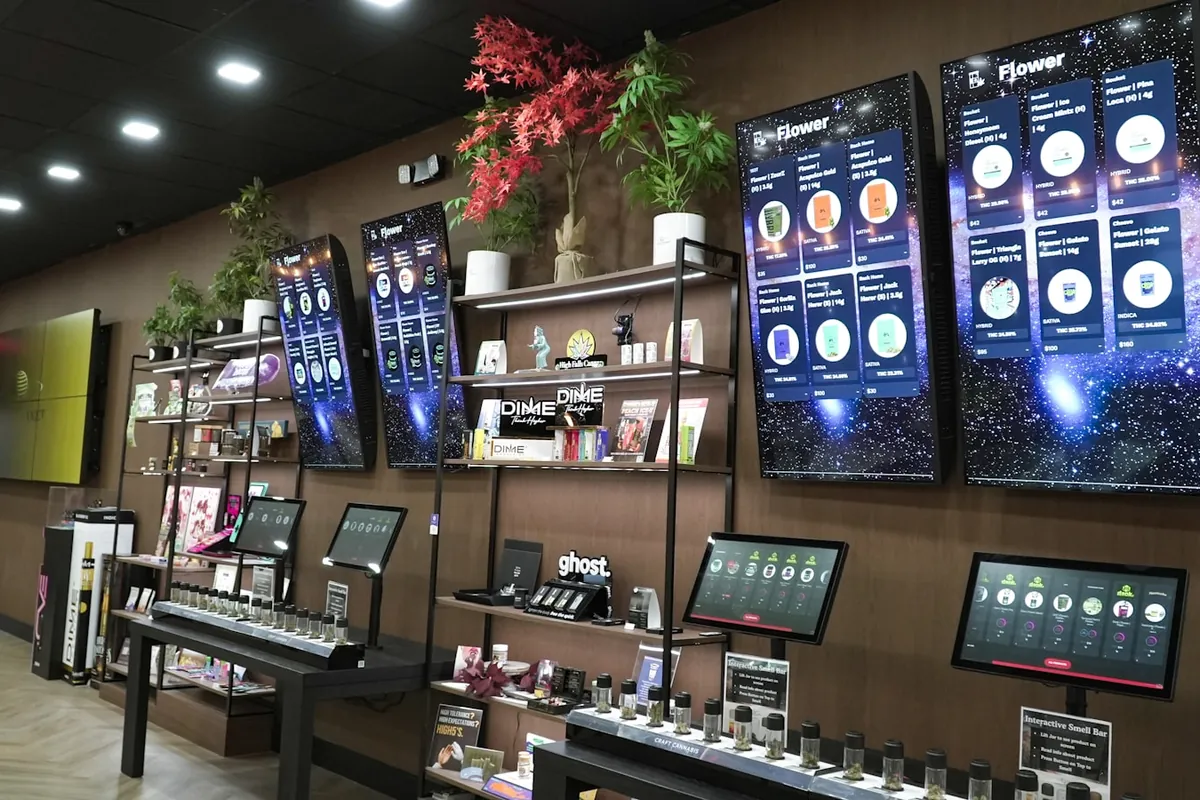
Why Austin Businesses Are Switching to Digital Signage
Three local pressures are driving adoption faster here than the national average:
- Retail and restaurant turnover. Austin’s commercial rents and menu/pricing changes move quickly; a screen updates in seconds where a printed menu board means a reprint order and a delay.
- Competing for attention on dense corridors. South Congress, the Domain, and East Austin retail strips are visually loud. Motion draws the eye in a way static signs can’t — a real advantage on a block with a dozen storefronts competing for the same walk-by.
- Multi-location operators. Austin chains and franchises managing 3–20 locations use digital signage specifically to push pricing and promo updates to every screen at once instead of coordinating printed materials across sites.
7 Types of Digital Signage for Austin Businesses
1. Menu boards
Restaurant and QSR staple. Multi-zone layouts let you separate food, drinks, and daily specials, with scheduled dayparts (breakfast menu swaps to lunch automatically at 10:30am).
2. Wayfinding and directory displays
Interactive touchscreens or static-rotation displays in office towers, medical campuses, and multi-tenant retail. Pairs naturally with physical wayfinding signage for the parts of navigation that don’t need a touchscreen.
3. Interactive kiosks
Self-service ordering, check-in, or product lookup. The highest install cost per unit, and typically the highest ROI when it removes a staffing bottleneck.
4. Video walls
Multiple screens tiled into one large canvas — lobbies, auto dealerships, event venues. Dramatic, but only worth the premium when the space and budget support it.
5. Window-facing displays
High-brightness screens designed to be readable through glass in direct sun — a real Austin-specific spec, since standard indoor panels wash out behind storefront glass most of the day.
6. Outdoor digital displays
Weatherproof, high-nit screens for drive-thru boards and street-facing installations. Needs its own electrical and structural review — closer in complexity to a pylon sign project than an indoor TV install.
7. Corporate and lobby displays
Brand content, wayfinding, and internal communications for office lobbies and conference floors — usually the easiest install of the seven, since it’s indoor, low-brightness, and low-traffic-impact.
Digital Signage Cost in Austin (2026)
| System type | Typical installed cost (per screen) |
|---|---|
| Single indoor menu board / lobby display | $1,800 – $4,500 |
| Multi-zone menu board system (3–4 screens) | $6,000 – $14,000 |
| Interactive kiosk | $5,000 – $12,000 |
| Video wall (per linear foot of tiled screens) | $2,500 – $6,000+ |
| Outdoor high-brightness display | $8,000 – $25,000+ |
| Content management software (annual, per screen) | $180 – $600 |
Installed cost includes the display, mount, media player, cabling, and setup — but software is typically a separate recurring line, and it’s the one first-time buyers most often forget to budget. For how digital signage compares against every other sign category, see our Austin business sign cost guide.
Screens, Media Players, and Mounting: What Goes Into a System
Three components make or break reliability:
- Display panel: commercial-grade (not consumer TV) panels run 16–18 hours a day for 5+ years without burn-in, and carry a warranty that assumes that duty cycle. Consumer TVs don’t.
- Media player: a dedicated box or built-in system-on-chip that runs the content management app. Under-specced players are the #1 cause of stuttering, crashing, or a screen that needs a weekly manual reboot.
- Mounting: wall mounts, ceiling drops, or menu-board frames engineered for the screen’s weight and the wall’s construction — the same “know your wall” problem as any illuminated sign install.
Content Management: How You Actually Update the Screen
This is the part that determines whether your investment still looks current in year two. A real content management system (CMS) should let you:
- Update content remotely from a phone or browser, no on-site visit required.
- Schedule content by daypart, day of week, or promotion window automatically.
- Push the same update to every screen across multiple locations at once.
- See which screens are online, offline, or need a hardware check — without physically walking to each one.
Skip the software question at purchase time and you’ll own a very expensive, very static picture frame within a year — the exact failure mode that makes some businesses regret going digital instead of sticking with printed boards.
Digital Signage by Industry: What Works Where
- Restaurants: menu boards with daypart scheduling; drive-thru order confirmation screens.
- Medical and dental offices: waiting-room wayfinding and patient education content, paired with required ADA-compliant interior signage.
- Retail: window-facing promo displays and in-store product information kiosks.
- Corporate offices: lobby branding, meeting-room scheduling displays, internal announcements.
- Multi-tenant properties: lobby directories and monument sign digital tenant panels.
- Auto dealerships and showrooms: video walls and interactive vehicle spec kiosks.
Permits and Austin Sign Code for Digital Displays
Permit requirements scale with where the screen lives and how bright it is. Purely indoor displays generally don’t need a City of Austin sign permit. Outdoor or window-facing digital displays visible from the public right-of-way usually do — and in some overlay districts, changeable-message displays face additional brightness and dwell-time restrictions the City of Austin Development Services Department reviews specifically. Confirm before you commit to an outdoor spec; our Austin sign regulations guide covers the general permit process this falls under.
Installation, Network, and Power: What to Plan For
Three practical items that get missed on first-time digital signage projects:
- Power at the exact mount point. Adding an outlet after the mount is set costs more than planning it during buildout.
- Network reliability. Cloud-managed screens need a stable connection; a flaky guest Wi-Fi network is not the same thing as a dedicated signage network drop.
- Ventilation for enclosed cabinets. Outdoor and kitchen-adjacent installs need heat management, or the display shortens its own lifespan.

6 Mistakes That Sink a Digital Signage Rollout
- Buying a consumer TV to save money. It fails the duty cycle within 12–18 months of commercial use.
- Skipping the CMS budget line. A screen nobody can update becomes a static sign at a digital sign’s price.
- Undersizing the media player. Video stutters, apps crash, someone has to reboot it weekly.
- No brightness plan for sun exposure. A screen behind west-facing glass is unreadable by 4pm without the right nit rating.
- Treating it as “install and forget.” Content that never changes defeats the entire purpose — and looks worse than a well-designed static sign.
- No network plan. A cloud CMS with no reliable connection means manual USB updates forever.
Digital Signage ROI: What It Actually Returns
Digital signage’s real return comes from three places: faster promotion changes (no reprint costs or lead time), higher perceived attention at the point of sale, and, for multi-location operators, dramatically lower coordination cost when updating pricing or messaging across every site simultaneously. Industry data from the International Sign Association consistently shows dynamic, motion-based signage outperforms static signage for attention capture — exactly the mechanism digital signage is built to exploit.
Digital Signage vs. Traditional Signage: When Each Wins
Digital isn’t a universal upgrade — it’s a different tool. Here’s how we help Austin clients decide between a digital display and a traditional illuminated sign like channel letters or a lightbox:
| Factor | Digital wins when… | Traditional wins when… |
|---|---|---|
| Content changes | Daily/weekly (menus, promos, pricing) | Content is essentially permanent (brand name, address) |
| Sun exposure | Indoor or high-brightness outdoor spec | Direct west-facing sun without a high-nit budget |
| Budget | Ongoing marketing spend justifies software cost | One-time capital spend preferred, no recurring fee |
| Multi-location | 3+ sites need synced updates | Single location, rarely changes |
| Power/network access | Already available at the mount point | Retrofitting power/data costs more than the sign itself |
Most Austin storefronts end up with both: a primary illuminated sign for brand identity that never changes, plus a digital display for the content that does — menus, promotions, hours. That combination, not an either/or choice, is what most of our multi-tenant and restaurant clients land on.
Austin’s Climate: The Spec Question Nobody Asks Until It’s a Problem
Central Texas summers push both hardware and content design decisions that don’t come up in cooler markets:
- Brightness (nits). A 500-nit indoor panel behind west-facing glass on a July afternoon is functionally invisible. Window-facing and outdoor installs need 1,500–2,500+ nit displays rated for direct sun readability.
- Heat inside enclosures. An outdoor cabinet in full Austin sun can exceed 140°F internally without ventilation or active cooling — well past most consumer electronics’ safe operating range, and the single most common cause of early outdoor-display failure we see.
- Contrast, not just brightness. Bright doesn’t automatically mean readable; content with strong contrast and larger text reads better in direct sun than a busy, high-detail layout at any brightness level.
None of this is exotic engineering, but it’s the difference between a display that reads clearly at 4pm in August and one that a customer complains about within its first summer.
Choosing a Vendor: 8 Questions Before You Sign
- Do you spec commercial-grade panels, or resell consumer TVs?
- What CMS do you use, and can I try the dashboard before I buy?
- Who handles the network and power planning — you, or my electrician separately?
- What’s the warranty on the display versus the media player, and are they different lengths?
- If a screen fails, what’s your response time for an on-site diagnosis?
- Can I see three installs of the same system type within Austin?
- Do you handle the sign permit if my display is outdoor or window-facing?
- What happens to my content library if I ever switch vendors?
A vendor who answers all eight without hesitation has done this before. Hesitation on the warranty or permit question is the one worth pressing on.
Keeping It Running: What Ongoing Care Actually Looks Like
Digital signage isn’t zero-maintenance, but it’s a different kind of upkeep than a lit sign’s LED modules and power supplies:
- Firmware and CMS updates. Most run automatically, but a periodic check confirms every screen is on the current version.
- Content audits. Set a monthly reminder to check every screen for stale content — last month’s promo still running is a worse look than no digital sign at all.
- Physical cleaning. Touchscreens especially need regular cleaning; fingerprints and glare compound on high-traffic kiosks.
- Network health checks. A screen that silently drops offline overnight and stays frozen on the last frame is the #1 complaint we hear from clients who skipped remote-monitoring alerts.
Pair this with the same seasonal inspection habit we recommend for illuminated signs in our sign maintenance guide — check everything with a bulb, a screen, or a motor twice a year, not after something visibly fails.
When NOT to Go Digital: An Honest Take
We’ll talk clients out of digital signage as often as we talk them into it. Skip it, at least for now, if:
- Your content genuinely doesn’t change more than a couple times a year — a well-designed non-illuminated sign costs less to own over five years.
- You don’t have staff bandwidth to actually update content regularly — a stale digital display reads worse than a static one.
- Your space has no reliable power or network access at the mount point and retrofitting costs more than the display itself.
Digital signage earns its cost when content genuinely changes often enough to matter. If it doesn’t yet, it’s a good six-months-from-now project, not a today project — and we’ll tell you that directly during a site survey.
Digital Signage FAQs
How much does digital signage cost per month?
Software/CMS subscriptions typically run $15–$50 per screen per month; hardware is a one-time install cost, not a subscription, unless leased.
Do I need a permit for indoor digital signage in Austin?
Usually not for purely indoor displays. Outdoor or window-facing displays visible from the street generally do need a sign permit.
Can I update digital signage content myself?
Yes — that’s the entire point of a real CMS. You should never need to call your sign company to change a price or swap a promo image.
How long do commercial digital displays last?
Commercial-grade panels typically run 5–7 years at full duty cycle; consumer TVs used commercially often fail within 1–2 years.
What’s the difference between digital signage and a regular TV on the wall?
Commercial duty-cycle rating, remote content management, warranty built for continuous use, and typically better brightness and viewing-angle performance for retail environments.
Is digital signage worth it for a small single-location business?
Often yes for restaurants and retail with frequently changing pricing or promotions; less often for professional offices where content rarely changes. The daily-content-change test from earlier in this guide is the fastest way to decide.
Can digital signage work alongside my existing illuminated sign?
Yes — this is the most common setup we install. A permanent channel letter or monument sign handles brand identity, while a digital display handles the content that changes weekly. Neither replaces the other.
Have a question about your specific space? Our FAQ page covers more general signage questions, or reach out directly — we answer digital signage questions daily.
Considering digital signage for your Austin business? We’ll survey your space, spec the right display and CMS for your use case, and handle the install end to end. Request a free quote, browse our digital signage service page, or call (512) 621-8822.